
How To Replace A Henry Hoover Power Cable
If your Henry Hoover keeps cutting out, has intermittent power or the cable insulation is damaged, the power cable may need replacing.
A damaged vacuum cable should not be ignored, especially if the internal wires are exposed, the cable becomes hot or the machine only works when the cable is moved.
This guide shows you how to replace a Henry Hoover power cable step by step.
The repair is fairly straightforward if you are comfortable working on electrical appliances, but always take your time and seek professional help if you are unsure.
ALWAYS DISCONNECT THE VACUUM CLEANER FROM THE MAINS BEFORE CARRYING OUT THIS REPAIR.
What You Will Need
- Replacement Henry Hoover power cable
- Crosshead screwdriver or Torx T15 screwdriver
- A clean workspace
Older Henry models normally use standard crosshead screws, while many newer models use star-shaped Torx T15 screws.
Need A Replacement Henry Power Cable?
If your existing cable is split, damaged or causing intermittent power, replacing the complete cable is usually the correct repair.
Our replacement Henry power cable is designed as a direct replacement for compatible Henry, Hetty and Numatic models.
Step 1 – Remove The Outer Screws
- Unplug Henry from the mains.
- Turn the motor head over so you can access the base.
- Remove the four outer screws holding the lower section in place.
- Older Henry models normally use a standard crosshead screwdriver.
- Many newer models require a Torx T15 screwdriver.
Step 2 – Remove The Cable Rewind
- Carefully lift out the cable rewind assembly.
- Check the contacts underneath the rewind for signs of burning, excessive dirt or wear.
If you find obvious burning or melted components, do not simply fit a new cable without checking the cause of the damage.
Step 3 – Open The Cable Rewind Assembly
- Remove the three screws underneath the cable rewind assembly.
- Carefully separate the casing to gain access to the cable terminals.
Step 4 – Remove The Old Henry Cable
- Note where the brown and blue wires are connected before removing anything.
- Unscrew the cable terminals and remove the old cable.
- Check the terminal area for signs of overheating, burning or melting.
Step 5 – Transfer The Cable Guide
- Remove the cable guide from the old cable and fit it onto the replacement cable.
- This is the rounded square plastic guide that sits where the cable exits the machine.
- Make sure it is fitted in the same position and orientation as the original.
If you are unsure where the cable guide fits, the video further down the page shows this part of the repair.
Step 6 – Connect The New Cable
- Position the new cable inside the rewind assembly.
- Connect the wires securely to the correct terminals.
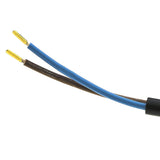
- Blue wire connects to the terminal marked N.
- Brown wire connects to the terminal marked L.
- Make sure the conductors are held securely and no loose strands can contact another terminal.
Step 7 – Reassemble The Cable Rewind
- Refit the top of the rewind assembly.
- Replace and tighten the three screws removed earlier.
- Make sure the cable is routed correctly and nothing is trapped between the two halves of the casing.
Step 8 – Refit The Cable Assembly
- Wind the replacement cable neatly around the rewind.
- Place the complete rewind assembly back into the Henry motor head.
- Make sure the cable guide sits correctly in its opening with no obvious gaps.
Step 9 – Refit The Outer Shell
- Replace the lower section of the Henry motor head.
- Refit and tighten the four outer screws.
- Check that the cable moves freely and has not been trapped during reassembly.
The Henry Hoover power cable replacement is now complete.
Common Signs Your Henry Cable Needs Replacing
- Henry cuts in and out during use
- The vacuum only works when the cable is moved
- Visible cuts or damage to the cable insulation
- Frayed or split cable covering
- The cable becomes unusually warm
- Burn marks around the cable, plug or rewind area
If the cable or plug shows signs of burning or overheating, stop using the vacuum until the fault has been properly identified and repaired.
Frequently Asked Questions
Why Does My Henry Hoover Keep Cutting Out?
A damaged power cable or worn cable-rewind contacts are common causes of intermittent power on Henry vacuums.
Can I Replace A Henry Hoover Cable Myself?
Yes, many owners replace Henry power cables themselves. However, this involves mains electrical wiring, so if you are not confident carrying out the repair safely, have it done by someone competent.
What Screwdriver Does A Henry Hoover Use?
Older Henry models often use crosshead screws, while many newer models use Torx T15 screws.
Why Does My Henry Cable Get Hot?
Heat can be caused by a damaged cable, poor electrical connection, worn contacts or another fault. Stop using the vacuum if the cable or plug becomes unusually hot.
Do All Henry Hoover Cables Fit The Same?
Many standard Henry, Hetty and Numatic domestic models use similar cable arrangements, but always check the compatibility of the replacement cable before ordering.
Can A Damaged Henry Cable Cause Intermittent Power?
Yes. If Henry cuts out when the cable is moved or only works in certain positions, the cable may be internally damaged.
Watch The Full Henry Cable Replacement Video
The video below shows how to replace a Henry Hoover power cable step by step.